Vodafone Giga5G Mobile Data Plans


Unleash 5G Speeds with Vodafone Fiji! We offer flexible prepaid 5G mobile internet plans with generous data bundles and varied validity periods to suit different usage needs. Whether you need large monthly quotas or shorter, smaller data packages, there’s something for you.


Giga5G Daily Plan

$5

20GB
24 Hours
✓ 5G Speeds
✓ Data Rollover
✓ Auto Renewal
✓ Hero Plan Badge
Giga5G Weekly Plan

$12

50GB
7 Days
✓ 5G Speeds
✓ Data Rollover
✓ Auto Renewal
✓ Hero Plan Badge
Giga5G Fortnightly Plan

$20

80GB
14 Days
✓ 5G Speeds
✓ Data Rollover
✓ Auto Renewal
Giga5G Flex Plan

$30

170GB
25 Days
✓ 5G Speeds
✓ Data Rollover
✓ Auto Renewal
✓ Hero Plan Badge
Giga5G Monthly Plan

$40

260GB
30 Days
✓ 5G Speeds
✓ Data Rollover
✓ Auto Renewal
✓ Hero Plan Badge
Giga5G Monthly Plus

$50

350GB
30 Days
✓ 5G Speeds
✓ Data Rollover
✓ Auto Renewal


Where is 5G Available?


Terms & Conditions

The following terms and conditions apply to Vodafone Giga5G Mobile Data Plans:

  • Usability:  Prepaid Vodafone Mobile Internet Users can access 5G services using the following 5G devices provided that their software updates are up-to-date. This list of devices will be updated as soon as device manufacturers release new 5G-ready software updates.
  • Samsung Galaxy S26
  • Samsung Galaxy S26 Ultra
  • Samsung Galaxy S25
  • Samsung Galaxy S25+
  • Samsung Galaxy S25 ultra
  • Samsung Galaxy S24
  • Samsung Galaxy S24+
  • Samsung Galaxy S24 ultra
  • Samsung Galaxy S24 FE
  • Samsung Galaxy S23 FE
  • Samsung Galaxy S23
  • Samsung Galaxy S23+
  • Samsung Galaxy S23 Ultra
  • Samsung Galaxy Z Fold 7
  • Samsung Galaxy Z Flip
  • Samsung Galaxy A57 5G
  • Samsung Galaxy A56 5G
  • Samsung Galaxy A55 5G
  • Samsung Galaxy A54 5G
  • Samsung Galaxy A37 5G
  • Samsung Galaxy A36 5G
  • Samsung Galaxy A35 5G
  • Samsung Galaxy A34 5G
  • Samsung Galaxy A26 5G
  • Samsung Galaxy A25 5G
  • Samsung Galaxy A17 5G
  • Samsung Galaxy A16
  • Apple iPhone 12 and above using iOS 26.2 and above
  • Xiaomi
  • Nubia
  • TCL
  • Oppo
  • Motorola
  • OnePlus
  • Honor
  • Huawei
  • ZTE
  • Auto-renewal: Vodafone Giga5G Mobile Data plans subscribed from *555# and *181# are set to auto-renew after their expiry period. To un-subscribe from the 5G data plans, dial *555# or *181#, select the plan you are subscribed to and select Option 2 to "Un-subscribe".
  • Data rollover: Remaining data will rollover upon auto-renewal or re-subscription of any rollover Data Plan before expiry. The remaining data will roll over to the furthest data plan expiry.
  • Exclusions: Rollover and Auto-renewal do not apply to Vodafone Mobile Data Gift Plans.
  • 5G requirements: To use Vodafone Prepaid 5G Mobile Internet Services, you must have a 5G-capable smartphone updated with a special 5G software update, be in a 5G coverage area, have a 5G-enabled data plan, and ensure that the network mode on your device is set to 5G. Note: Power Saving features may restrict your phone from accessing 5G in order to conserve battery power. Disable Power Saver Mode to access 5G. Customers using a 4G smartphone or a 5G smartphone that has not received a special 5G software update from their device manufacturer, or live outside a 5G coverage area can purchase and use Giga5G data plans at 3G/4G speeds.
    • Special 5G software update: Some 5G smartphones are not 5G-Ready yet as they need a special software update to connect to 5G. These updates are released by smartphone manufacturers. Manufacturers are working to release these updates as quickly as possible. After manufacturers have released a special 5G software update patch, customers will be notified by SMS to update their software.
    • Validity: Promotion is valid until further notice.


    6. What are the charges for the service?

    a. Prepay standard charge: $0.02 FJD per MB.

    b. Prepay free sites/apps: www.vodafone.com.fj, MyVodafone App, MPAiSA App

    *Fair usage policy
    Prices and data plan benefits are subject to change without notice during promotions. Last Updated : 011/07/2022

    7. How can I recharge to get access to the Internet?

    a. All you need is to get a normal recharge voucher and top up your account.

    b. You can also buy a recharge from the MPAiSA App or dialing *181#.

    8. Are there any hidden charges that I should know about?

    a. There are no hidden charges, however if you purchase any item or content on the Internet there will be charges that apply for those items. These charges may not be charged by Vodafone Fiji.

    9. How can I find out how much of my credit has been used?

    a. For prepay service, you will be able to check your balance by dialing *131#, calling 131 or using the MyVodafone App.

    b. For postpay service, you will be notified on your monthly bill or you could use the MyVodafone App.

    c. You will not be able to see how much data has been downloaded/uploaded from your account.

    10. Coverage - Where can I use it?

    a. Wherever Vodafone has coverage / reception, you will have access to the Internet. This could be based in GPRS/3G/4G and 4G+ coverage areas.

    b. Customers will have higher access speeds by using a 4G+ smartphone and getting connected to a 4G+ coverage base station.

    11. Can I use my phone as a modem to access internet on my laptop/PC?

    a. You may be able to use some phones, however this feature has been disabled on most phones.

    12. Do I get charged for accessing or browsing the Vodafone Website/MyVodafone App/MPAiSA App?

    a. No. Browsing the Vodafone Website/MyVodafone App/MPAiSA App will be free, however any content you download or Internet links you browse outside these sites/apps will be charged as per the above charges.

    13. What are the settings I need on my phone?

    a. If you have purchased the phone from any Vodafone retail shop, the settings will already be configured.

    b. If you have purchased the phone from any other vendor, you will need to configure and setup your phone's internet settings. You will require the following details:

    Prepaid Customers (these are existing WAP settings)

    APN or Access Point Name: live.vodafone.com.fj
    IP or Proxy Address : (leave blank)
    Port or Proxy Port: (leave blank)
    Username (leave blank)
    Password (leave blank)
    Security No or Not Secure or Normal

    Note: Postpay customer who don’t have “Mobile office” office plan can also use the above details. Postpay (Mobile Office)

    Postpaid Customers

    APN or Access Point Name: vfinternet.fj
    IP or Proxy Address No or 0.0.0.0
    Port or Proxy Port No or 0
    Username (leave blank)
    Password (leave blank)
    Security No or Not Secure or Normal

    c. If you are not sure where the settings need to be configured, please call our 24 Hour customer service number 124 for prepay and 125 for postpay customers.

    14. Can I get an e-mail account with this connection?

    a. We do not provide e-mail accounts.

    b. The service does allow you to get access to any existing e-mail (POP/IMAP) that you may have, provided your phone can support it.

    15. Can I access any Instant Messaging or Social Networking sites and applications

    a. If your phone has a WAP/WEB Browser, accessing social networking sites will be possible.

    b. If you are able to install software/apps on your phone, you may be able to download and install Instant Messaging apps to enable you to use this service.

    So now that you know, go on and...GET ONLINE!!
    7. Will the plan still be valid if user travels from one roaming country to another?

    Yes, bundle plan benefits will remain active if user travels from one roaming bundle country to another roaming bundle country. However, the roaming bundle plan benefits will not be applicable if user travels from roaming bundle country to another country that is not listed in the roaming bundle plan.

    6. Roaming bundles are applicable to 22 countries on Postpay and only 12 countries on Prepay. Why is Vodafone Fiji not able offer same countries on Postpay to Prepay customers for the roaming bundles?

    Postpaid and Prepaid roaming works on different platform where Postpaid customers use the services first and pay later whereas Prepaid customers are charged instantly for the service. Roaming historically was always offered / meant for postpaid customers. While Vodafone Fiji has advanced in upgrading / launching roaming services for prepaid customers, there are still many operators around the world who have infrastructure constraints to launch / offer prepaid roaming services. As and when roaming partners become ready, we will keep on negotiating and adding more countries on Prepaid roaming bundle plans.

    5. Does roaming bundles apply to all the countries visited by Vodafone prepay customers?

    No, prepay roaming bundles are only applicable to selected 12 countries and these countries are: New Zealand, Australia, Hong Kong, Singapore, USA, Canada, India, UK, Sri Lanka, Vanuatu, Samoa and Tonga.

    4. How was Vodafone Fiji able to bring such a massive reduction in rates and why was this not possible before?

    Vodafone Fiji continuously works with roaming partners to negotiate rates for roaming. After continuous negotiations with the roaming partners, we came through a mutual goal to increase roaming traffic through reduced rates. As per norm, the benefit of any cost reduction is automatically passed on to our customers.

    3. What will be the charge if customer forgets to subscribe to the roaming bundles?

    Standard roaming charges will apply if the customer forgets to subscribe to the roaming bundle plan. Refer standard rates table for more details.

    2. Will Prepay roaming bundles be activated by default? What does the customer need to do to in order to use the Prepay roaming bundles?

    Prepay roaming bundles will not be active by default. To opt-in customers need to dial *100# and select the daily, weekly or monthly pan of their choice.

    1. What does the customer need to do in order to use roaming services while visiting overseas and how to get roaming access activated?

    Prepay roaming services are open to all Vodafone Prepay customers. To use prepay roaming services, customers simply need to ensure they have the sufficient real money balance in their mobile account before they travel. Online top up option is also available for customers from anywhere in the world. Customers simply need to visit Vodafone Fiji website on www.vodafone.com.fj and select Web Top Up option to do online top up.

    Terms & Conditions:

    • To access roaming services on an overseas network, your mobile device must be compatible with the network technology offered in the country of roaming.  Eg.  To access, roaming services on your 2G device, the country of roaming must provide 2G network.
    • Offer applicable for Vodafone Prepay customers. Ensure you have sufficient real money balance in your mobile account before you travel.
    • Online top-up option is also available from anywhere in the world.
    • Roaming access is open to all Vodafone Prepay customers.
    • Roaming plans are available in New Zealand, Australia, Hong Kong, Singapore, USA, Canada, India, UK, Sri Lanka, Vanuatu, Samoa and Tonga.
    • To opt-in to the roaming bundles, dial *100# and select the daily, weekly or monthly plan of your choice.
    • Roaming plan will be activated once you receive a confirmation text message.
    • Roaming bundle minutes can be used to make calls back to Fiji, calls within the roaming country and for receiving calls from anywhere.
    • SMS can be used to send SMS anywhere.
    • Receiving SMS will be free.
    • Data can be used in the country of roaming.
    • Daily roaming plans will auto-renew everyday at 12.00am Fiji time.
    • To opt-out from auto-renew, dial *100# and unsubscribe.
    • Auto renewal does not apply on Weekly and Monthly plans.
    • Standard roaming charges will apply outside of the roaming bundle plan.
    • Offer valid until further notice.
    • Vodafone number range are as follows: 27, 28, 29, 80, 83, 86, 89, 90, 91, 92, 93, 94, 97 and 99.
    • For more information call 124 (Free for Prepay), 123 (Charged) or visit www.vodafone.com.fj

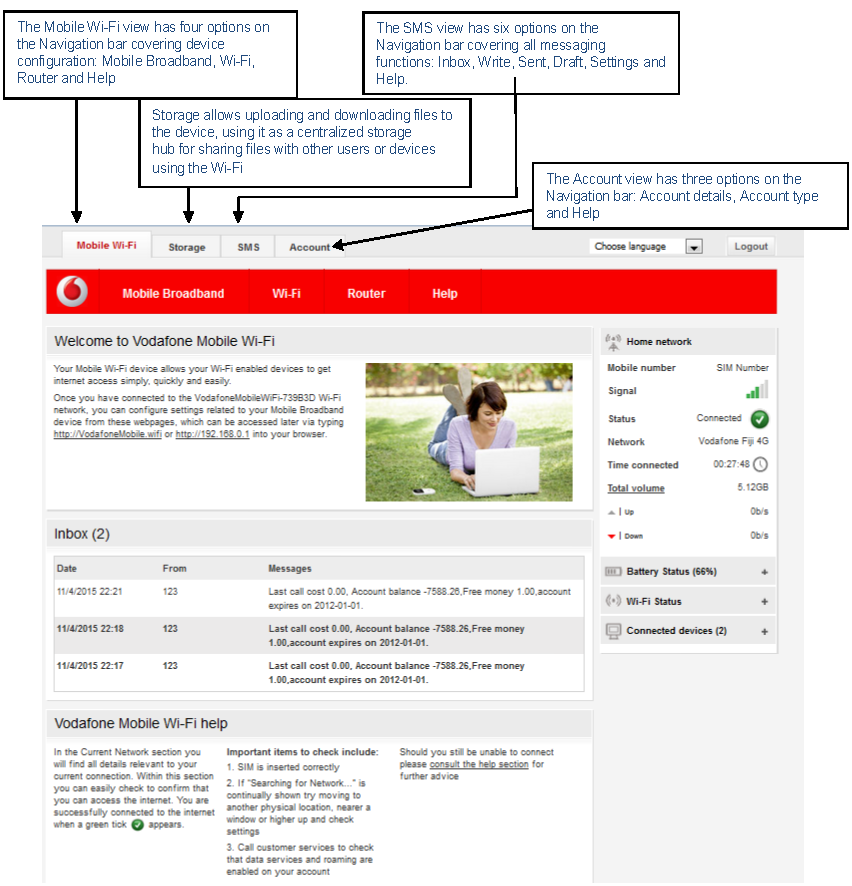
    6. Logged As Administrator

    pocket-wifi-install-step6

    5. Vodafone Mobile Wi-fi Configuration

    When you are connected to the Vodafone pocket wi-fi via wi-fi or a USB cable, you can access the Vodafone Mobile Wi-fi configuration screen by typing either http://VodafoneMobile.wifi or http://192.168.0.1 into your web browser. Log in as an administrator to make changes. The default administrator login password is admin. You can change settings and check the device and network status from this browser page.
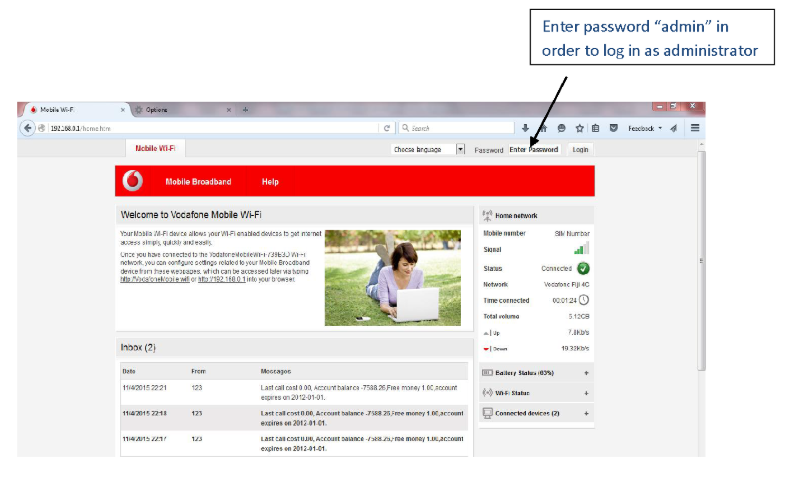
    pocket-wifi-install-step5

    Copyright © 2026 Vodafone Fiji.   Privacy Policy  |  Terms & Conditions  |  Sitemap