Vodafone Giga5G Mobile Data Plans


Unleash 5G Speeds with Vodafone Fiji! We offer flexible prepaid 5G mobile internet plans with generous data bundles and varied validity periods to suit different usage needs. Whether you need large monthly quotas or shorter, smaller data packages, there’s something for you.


Giga5G Daily Plan

$5

20GB
24 Hours
✓ 5G Speeds
✓ Data Rollover
✓ Auto Renewal
✓ Hero Plan Badge
Giga5G Weekly Plan

$12

50GB
7 Days
✓ 5G Speeds
✓ Data Rollover
✓ Auto Renewal
✓ Hero Plan Badge
Giga5G Fortnightly Plan

$20

80GB
14 Days
✓ 5G Speeds
✓ Data Rollover
✓ Auto Renewal
Giga5G Flex Plan

$30

170GB
25 Days
✓ 5G Speeds
✓ Data Rollover
✓ Auto Renewal
✓ Hero Plan Badge
Giga5G Monthly Plan

$40

260GB
30 Days
✓ 5G Speeds
✓ Data Rollover
✓ Auto Renewal
✓ Hero Plan Badge
Giga5G Monthly Plus

$50

350GB
30 Days
✓ 5G Speeds
✓ Data Rollover
✓ Auto Renewal


Where is 5G Available?


Terms & Conditions

The following terms and conditions apply to Vodafone Giga5G Mobile Data Plans:

  • Usability:  Prepaid Vodafone Mobile Internet Users can access 5G services using the following 5G devices provided that their software updates are up-to-date. This list of devices will be updated as soon as device manufacturers release new 5G-ready software updates.
  • Samsung Galaxy S26
  • Samsung Galaxy S26 Ultra
  • Samsung Galaxy S25
  • Samsung Galaxy S25+
  • Samsung Galaxy S25 ultra
  • Samsung Galaxy S24
  • Samsung Galaxy S24+
  • Samsung Galaxy S24 ultra
  • Samsung Galaxy S24 FE
  • Samsung Galaxy S23 FE
  • Samsung Galaxy S23
  • Samsung Galaxy S23+
  • Samsung Galaxy S23 Ultra
  • Samsung Galaxy Z Fold 7
  • Samsung Galaxy Z Flip
  • Samsung Galaxy A57 5G
  • Samsung Galaxy A56 5G
  • Samsung Galaxy A55 5G
  • Samsung Galaxy A54 5G
  • Samsung Galaxy A37 5G
  • Samsung Galaxy A36 5G
  • Samsung Galaxy A35 5G
  • Samsung Galaxy A34 5G
  • Samsung Galaxy A26 5G
  • Samsung Galaxy A25 5G
  • Samsung Galaxy A17 5G
  • Samsung Galaxy A16
  • Apple iPhone 12 and above using iOS 26.2 and above
  • Xiaomi
  • Nubia
  • TCL
  • Oppo
  • Motorola
  • OnePlus
  • Honor
  • Huawei
  • ZTE
  • Auto-renewal: Vodafone Giga5G Mobile Data plans subscribed from *555# and *181# are set to auto-renew after their expiry period. To un-subscribe from the 5G data plans, dial *555# or *181#, select the plan you are subscribed to and select Option 2 to "Un-subscribe".
  • Data rollover: Remaining data will rollover upon auto-renewal or re-subscription of any rollover Data Plan before expiry. The remaining data will roll over to the furthest data plan expiry.
  • Exclusions: Rollover and Auto-renewal do not apply to Vodafone Mobile Data Gift Plans.
  • 5G requirements: To use Vodafone Prepaid 5G Mobile Internet Services, you must have a 5G-capable smartphone updated with a special 5G software update, be in a 5G coverage area, have a 5G-enabled data plan, and ensure that the network mode on your device is set to 5G. Note: Power Saving features may restrict your phone from accessing 5G in order to conserve battery power. Disable Power Saver Mode to access 5G. Customers using a 4G smartphone or a 5G smartphone that has not received a special 5G software update from their device manufacturer, or live outside a 5G coverage area can purchase and use Giga5G data plans at 3G/4G speeds.
    • Special 5G software update: Some 5G smartphones are not 5G-Ready yet as they need a special software update to connect to 5G. These updates are released by smartphone manufacturers. Manufacturers are working to release these updates as quickly as possible. After manufacturers have released a special 5G software update patch, customers will be notified by SMS to update their software.
    • Validity: Promotion is valid until further notice.


    Nadi WiFi Hotspots

    Saffron

    Sigatoka WiFi Hotspots

    Tappoo

    Suva WiFi Hotspots

    1. Damodar City
    2. Tappoo City
    3. MHCC
    4. My Suva Picnic Park

    Conditions:

    • Available to Vodafone Prepay 3G/4G and 4G+ Broadband plans.
    • For Prepay Broadband Recharge via Hardcards, electronic vouchers, M-PAISA, Web Top Ups, ATMs, or TXT Top Up Fiji Wide. 
    • In order to use Prepaid 4G+ Broadband service, it is mandatory to have a 4G+ sim card, be in a 4G+ coverage area and have a 4G+ Pocket Wifi.
    • Promotion is only applicable to denominations listed above.
    • Credit transfer does not apply to Broadband recharge.
    • Broadband Data Bonanza is only applicable to Broadband recharge. 
    • Data Bonanza Promotion is valid from Friday 29th May to 30th May, 2020.
    • For more information, please contact our customer care on 124 (Prepay) or 123 (Charged).

    Terms & Conditions:

    • This promo is applicable on recharge done from Shop N Save Supermarket, Mangere Auckland, New Zealand. 
    • Free Money and Free Data expires within the specified time stated above and will not be extended with new recharge. 
    • Data roll-over does not apply on the free data. Free money can be used for on-net calls and sms only. 
    • On-net means Vodafone to Vodafone and Vodafone to Inkk. 
    • Promotion end date will be communicated via SMS broadcast. 
    • For more information call 124 (Free for Prepay), 123 (Charged) or visit www.vodafone.com.fj 

    Bonanza Everyday - Terms And Conditions:

    • 5UP Everyday Recharge Bonanza Promotion is applicable on Recharge of $25.
    • Recharge can be done using Hard Cards, Electronic Vouchers, M-PAiSA, Web Top-Ups, My Vodafone App, BSP and Westpac Mobile Banking, BSP and ANZ ATMs or TXT Top Up Fiji-wide.
    • Recharge PIN must be activated during the promotion period to receive the free money.
    • Free Money expires in 20 days and can only be used for on-net* Calls and SMS.
    • On-net means Vodafone to Vodafone and Vodafone to Inkk.
    • Promotion is for Vodafone Prepay customers.
    • Vodafone number range are as follows: 22, 23, 24, 26, 27, 28, 29, 80, 83, 86, 89, 90, 91, 92, 93, 94, 97 and 99.
    • Promotion is valid until further notice and end date will be communicated via SMS broadcast.
    • For more information call 124 (Free for Prepay) and 123 (Charged Line).

    Conditions:

    • Dial *143# and select option 3 to ‘Subscribe’ or to ‘Gift’ the Pacific Calls bundle offer.
    • For only $2.00, get 15 minutes of Pacific Calls talktime which can be used to Call selected Pacific Island destinations as follows: Kiribati (all networks), American Samoa (all networks), Vanuatu (TVL numbers only) and Samoa (BlueSky numbers only).
    • BlueSky Samoa numbers start with 2, 3, 4, 5, 6, 75 & 76
    • TVL Vanuatu numbers start with 20, 22, 23, 24, 25, 26, 27, 28, 29, 30, 36, 37, 380, 381, 382, 383, 384, 385, 386, 387, 388, 484, 485, 486, 487, 488, 489, 70, 71, 73, 74, 75, 76, 77 & 88
    • Subscription to the plan expires at midnight daily.
    • Real Money and IOU Money can be used to subscribe to this promotion.
    • Multiple subscriptions to the bundle is allowed. 
    • Pacific Calls talktime expires within the specified time and will not be extended with new subscription.
    • Standard charges will apply outside the Pacific Calls Bundle.
    • Promotion is applicable on both mobile and landline calls and calls can be made via dialing 00 or 01.
    • Offer is applicable to Vodafone Prepay customers only.
    • Promotion end date will be communicated via SMS Broadcast.
    • Vodafone mobile numbers start with 22, 23, 27, 28, 29, 80, 83, 86, 89, 90, 91, 92, 93, 94, 97 & 99.
    • For more information call 124 (Free for Prepay), 123 (Charged) or visit www.vodafone.com.fj.

    Notice


    We reserve the right to change this privacy policy and in the event we do, we will post the revised privacy policy on our website. Our use of the information you provide shall be governed by the privacy policy that is effective at the time of receipt of such information. Once again, if you should have any further questions concerning this policy, please email us at info@vodafone.com.fj.

    3rd Party Sites


    This privacy policy is applicable only to information you provide to us through this website. We are not responsible for the privacy practices of any third party sites that are linked to or from our site.


    What choices do you have?

    If you prefer to contact us by phone or mail, please see our contact information page.


    What do we do with the information we collect?

    If personal information is voluntarily submitted through our site, we do use it to fulfill requests for marketing materials or other inquiries.

    We do not otherwise sell, rent, exchange or disclose our client lists or information about our web site users, except to the limited extent necessary to protect the rights, property and safety of our commission, our clients, or others or to comply with applicable law or if we are acquired and client information or information about our web site users is a transferred asset.

    What type of visitor information do we collect?

    Unless visitors voluntarily submit information via forms or email to Vodafone Fiji Pte Ltd. through the site, we do not collect any personal information at all. We do, however, analyze our server logs and identify usage patterns regularly. This information helps us to better manage our content and organize information in a more logical way for our visitors thereby improving the user experience.
     

    Conditions:

    • Dial *143# and select option 2 to ‘Subscribe’ or to ‘Gift’ the International Calls bundle offer.
    • Real Money and IOU Money can be used to subscribe to this promotion.
    • Standard charge of $0.15 per minute will apply outside the International Calls Bundle to the above listed countries.
    • International talktime expires within the specified time and will not be extended with new subscription.
    • Promotion is applicable only to the 8 countries stated above. Calls to other countries outside of this list will incur normal standard charges.
    • Promotion is applicable on both mobile and landline calls
    • Promotion is applicable to both calls made via 00 and 01.
    • Offer is applicable to Vodafone Prepay customers only.
    • Promotion end date will be communicated via SMS Broadcast.

    Steps to Turn Mobile Data ON/OFF

    1. Android
      1. Go to “Settings”
           Android  Settings
     
    1. Under “Network connections”, Tap on “More Networks”
            Network Connections
     
    1. Tap on “Mobile Networks”
           Mobile Networks
     
    1. Check the box near “Mobile data” to turn on your Mobile Data. Uncheck the box to turn data off.
           Mobile data
    1. iOS
      1. Go to “Settings”
       Settings
                        
     
    1. Tap on “Cellular”
            Cellular
     
     
    1. Switch on “Cellular Data” by tapping on the icon on the right to turn on your Mobile Data. To switch off your Mobile Data, tap on that icon again
           Cellular Data
     
    1. Windows
      1. Go to “Settings”
           Settings


    1. Tap on “mobile + SIM” or “cellular+SIM”
            cellular SIM


    1. Switch on “Data Connection” by swiping the icon to the right to turn on your Mobile Data. To switch off your Mobile Data, swipe the icon to the left
           Data Connection

    Setup Mobile Internet/APN

    Android

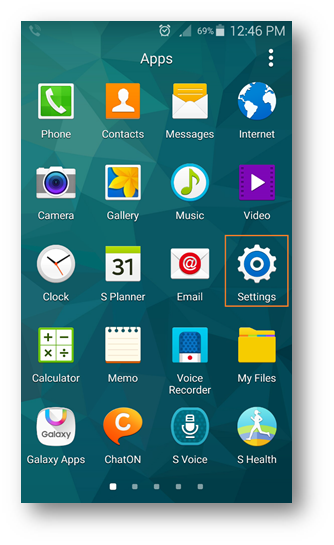
    i. Go to “Settings”
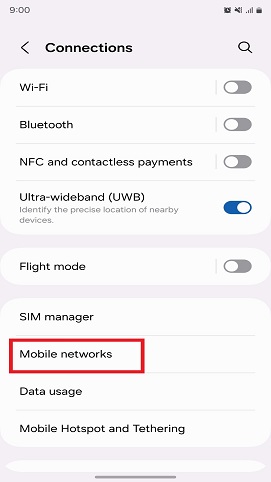
       Tap on “Connections”
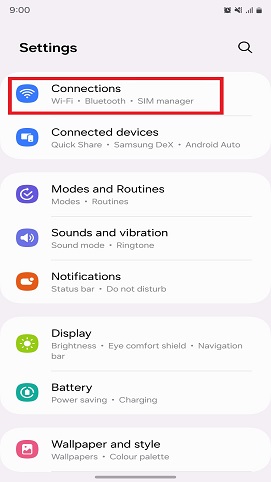
          1 Android
                       
     
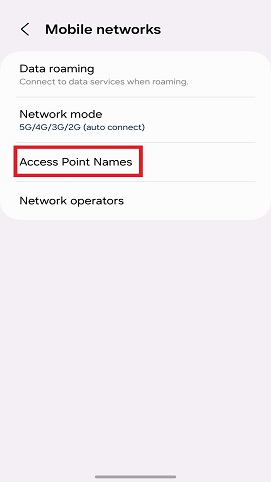
    1. Tap on “Mobile Networks”
           2 Android
     
     
    1. If you have Dual Sim, then select either SIM 1 or SIM 2.
      Tap on “Access Point Names”
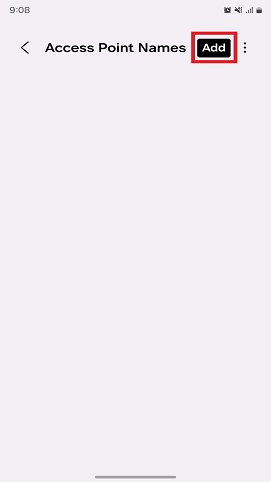
           3 Android
     
     
    1. Tap on “Add”
            4 Android
     
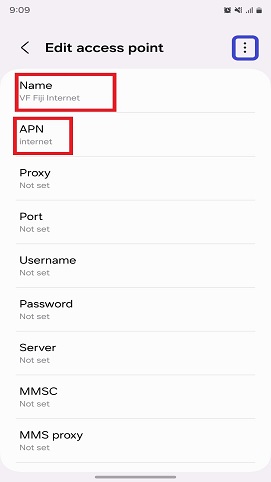
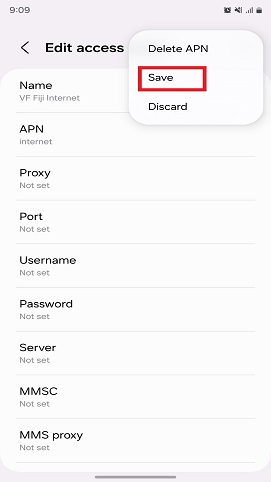
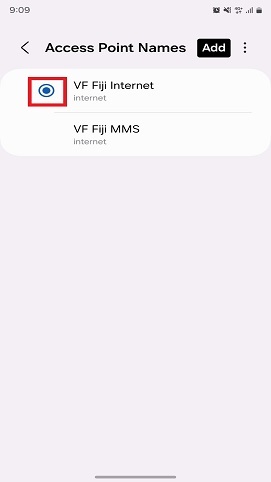
    1. Enter the “Name” as “VF Fiji Internet” and the “APN” as “Internet”. Once done, tap on the 3 dots on the top-right corner and select “Save”
            5 Android
      
             6 Android
     

    vi. Once saved, tap on the circle on the left of that APN to activate it.
           7 Android
     

        iOS 

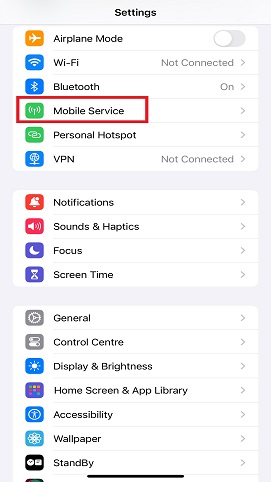
    i. Go to “Settings”.
       Tap on “Mobile Service”
           1 iOS
                         
     
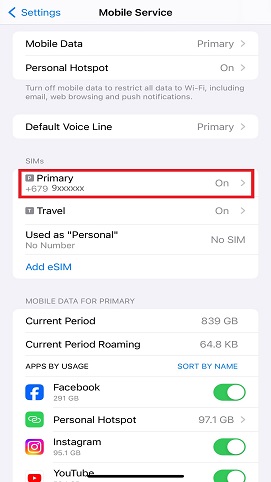
    1. Under SIMs, select a sim profile.
            2 iOS


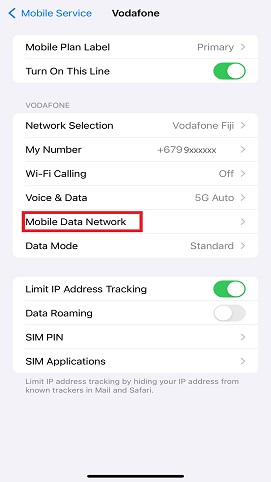
    1. Tap on “Mobile Data Network”
         3 iOS
     
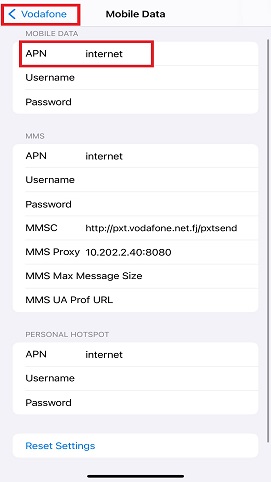
    iv. Enter “APN” as “internet”

        Once done, tap on “< Vodafone” to save the APN
            4 iOS


    Selecting Network Mode as 4G, 3G or 2G Connectivity

    The different network modes can influence the data speeds that your device can achieve.
    1. Android
      1. Go to “Settings”
          download (27)


    1. Under “Network connections”, Select “More Networks”
          download (11)
     
     
    1. Select “Mobile Networks”
          download (29)
     
    1. Select “Network Mode”
          download (30)
     
    1. Select LTE/WCDMA/GSM (auto connect) for 4G/3G/2G, WCDMA/GSM (auto connect)for 3G/2G, WCDMA only for 3G or GSM only for 2G
           download (31)
     
    • If you select LTE/WCDMA/GSM (auto connect), your phone automatically switches between the three network modes provided that you're within range of a 4G network.
    • If you select WCDMA/GSM (auto connect), your phone automatically switches between the two network modes provided that you're within range of a 3G network.
    • If you select WCDMA only, your phone can only connect to 3G networks.
    • If you select GSM only, your phone can only connect to 2G networks but you cannot achieve high data speeds.
     
    1. iOS
      1. Go to “Settings”
          download (32)


    1. Tap on “Cellular”
          download (33)
     
     
    1. If you want to use 4G, make sure “Enable 4G” is switched on. If you just want to connect to our 3G network, make sure “Enable 4G” is switched off.
          download (34)
     
     
    1. Windows
      1. Go to “Settings”
          download (35)


    1. Tap on “mobile+SIM” or “cellular+SIM”
          download (36)
     
     
    1. Tap on “Highest Connection Speed” and select either 4G, 3G or 2G
          download (37)
     
          download (38)
     
    • If you select 4G, your phone automatically switches between the three network modes provided that you're within range of a 4G network.
    • If you select 3G, your phone automatically switches between the two network modes provided that you're within range of a 3G network.
    • If you select 2G, your phone can only connect to 2G networks but you cannot achieve high data speeds.
     

    What do G, E, 3G, H, H+ and 4G (LTE)mean on notification bars?

    Symbol Meaning
    G G stands for GPRS (General Packet Radio Services) and this supports the lowest internet speed available on mobile phones
    E E stands for Edge and is typically called 2.5G as its data speed is in between 2G and 3G
    3G 3G works at a faster speed than Edge
    H H stands for HSPA (High Speed Packet Access) which is an enhanced form of 3G allowing higher data transfer rates
    H+ H+ is an enhanced version of HSPA which allows faster internet speed where 4G is not present 
    4G (LTE) 4G or LTE (long Term Evolution) is the fastest internet speed that is attainable by a mobile device

    Content Disclaimer:

    You agree that in relation to the content displayed on this site [Content], Vodafone does not, nor does any other party who provides Content to this site, make any warranty as to the accuracy, completeness or currency of the Content (except in relation to content contained on the Vodafone Direct site). As a user of this site, you should make your enquiries before entering into any transaction on the basis of or in reliance upon the content. To the extent permitted by law, Vodafone and its employees, officers, agents and contractors exclude all liability for any loss or damage) arising from the use of, or reliance upon the Content whether or not this is caused by a negligent act or omission.
    To the extent that Vodafone is prohibited at law from excluding its liability, Vodafone and each party providing Content limits its liability to the extent permitted by law, to the re-supply of the Content. Vodafone does not accept responsibility for any liability in respect of access to the other content through the use of this site.

    Trade Mark and copyright

    This site contains registered trademarks and trademarks, which are the subject of pending applications or which otherwise, are protected at law. Unless otherwise indicated,
    The trademarks are owned by Vodafone and may have protection under the laws of other countries. You are not permitted to use Vodafone's trademarks except
    (a) by saving or printing a copy of Vodafone's site as permitted below under the copyright permission;
    (b) through a legitimate reference to Vodafone or a Vodafone product or service with proper recognition of the trade mark's status; and
    (c) with Vodafone's prior written approval.

    The material on this site is the copyright of Vodafone and is protected by copyright under the laws of Fiji and other countries. You may save an electronic copy, or print out a copy, of parts of this site (including the names Vodafone Fiji Limited, Vodafone or the name of any other Vodafone company) solely for your own information, research or study, but only if
    (a) you do not modify the copy from how it appears on this site; and
    b)You include the copyright notice Vodafone on the copy. You must not however reproduce, frame, transmit (including broadcast), adapt, link to or otherwise use any of the Content, including audio and video excerpts, except as expressly permitted by stature or with Vodafone's prior written consent.

    Third Party sites

    This site contains links to third party sites.Vodafone is not responsible for the condition or the content of those sites.The link (s) are provided solely for your convenience and do not indicate, expressly or impliedly, any endorsement of the site (s) or the products or services provided there.You access those sites and use their products and services solely at your own risk.Vodafone does not represent that the content or services available from third party sites are appropriate or available for use in all parts of Fiji. If you access other content or services from Third party sites, Vodafone is not responsible for your compliance with local laws or other applicable laws.


    Copyright © 2026 Vodafone Fiji.   Privacy Policy  |  Terms & Conditions  |  Sitemap