Vodafone Giga5G Mobile Data Plans


Unleash 5G Speeds with Vodafone Fiji! We offer flexible prepaid 5G mobile internet plans with generous data bundles and varied validity periods to suit different usage needs. Whether you need large monthly quotas or shorter, smaller data packages, there’s something for you.


Giga5G Daily Plan

$5

20GB
24 Hours
✓ 5G Speeds
✓ Data Rollover
✓ Auto Renewal
✓ Hero Plan Badge
Giga5G Weekly Plan

$12

50GB
7 Days
✓ 5G Speeds
✓ Data Rollover
✓ Auto Renewal
✓ Hero Plan Badge
Giga5G Fortnightly Plan

$20

80GB
14 Days
✓ 5G Speeds
✓ Data Rollover
✓ Auto Renewal
Giga5G Flex Plan

$30

170GB
25 Days
✓ 5G Speeds
✓ Data Rollover
✓ Auto Renewal
✓ Hero Plan Badge
Giga5G Monthly Plan

$40

260GB
30 Days
✓ 5G Speeds
✓ Data Rollover
✓ Auto Renewal
✓ Hero Plan Badge
Giga5G Monthly Plus

$50

350GB
30 Days
✓ 5G Speeds
✓ Data Rollover
✓ Auto Renewal


Where is 5G Available?


Terms & Conditions

The following terms and conditions apply to Vodafone Giga5G Mobile Data Plans:

  • Usability:  Prepaid Vodafone Mobile Internet Users can access 5G services using the following 5G devices provided that their software updates are up-to-date. This list of devices will be updated as soon as device manufacturers release new 5G-ready software updates.
  • Samsung Galaxy S26
  • Samsung Galaxy S26 Ultra
  • Samsung Galaxy S25
  • Samsung Galaxy S25+
  • Samsung Galaxy S25 ultra
  • Samsung Galaxy S24
  • Samsung Galaxy S24+
  • Samsung Galaxy S24 ultra
  • Samsung Galaxy S24 FE
  • Samsung Galaxy S23 FE
  • Samsung Galaxy S23
  • Samsung Galaxy S23+
  • Samsung Galaxy S23 Ultra
  • Samsung Galaxy Z Fold 7
  • Samsung Galaxy Z Flip
  • Samsung Galaxy A57 5G
  • Samsung Galaxy A56 5G
  • Samsung Galaxy A55 5G
  • Samsung Galaxy A54 5G
  • Samsung Galaxy A37 5G
  • Samsung Galaxy A36 5G
  • Samsung Galaxy A35 5G
  • Samsung Galaxy A34 5G
  • Samsung Galaxy A26 5G
  • Samsung Galaxy A25 5G
  • Samsung Galaxy A17 5G
  • Samsung Galaxy A16
  • Apple iPhone 12 and above using iOS 26.2 and above
  • Xiaomi
  • Nubia
  • TCL
  • Oppo
  • Motorola
  • OnePlus
  • Honor
  • Huawei
  • ZTE
  • Auto-renewal: Vodafone Giga5G Mobile Data plans subscribed from *555# and *181# are set to auto-renew after their expiry period. To un-subscribe from the 5G data plans, dial *555# or *181#, select the plan you are subscribed to and select Option 2 to "Un-subscribe".
  • Data rollover: Remaining data will rollover upon auto-renewal or re-subscription of any rollover Data Plan before expiry. The remaining data will roll over to the furthest data plan expiry.
  • Exclusions: Rollover and Auto-renewal do not apply to Vodafone Mobile Data Gift Plans.
  • 5G requirements: To use Vodafone Prepaid 5G Mobile Internet Services, you must have a 5G-capable smartphone updated with a special 5G software update, be in a 5G coverage area, have a 5G-enabled data plan, and ensure that the network mode on your device is set to 5G. Note: Power Saving features may restrict your phone from accessing 5G in order to conserve battery power. Disable Power Saver Mode to access 5G. Customers using a 4G smartphone or a 5G smartphone that has not received a special 5G software update from their device manufacturer, or live outside a 5G coverage area can purchase and use Giga5G data plans at 3G/4G speeds.
    • Special 5G software update: Some 5G smartphones are not 5G-Ready yet as they need a special software update to connect to 5G. These updates are released by smartphone manufacturers. Manufacturers are working to release these updates as quickly as possible. After manufacturers have released a special 5G software update patch, customers will be notified by SMS to update their software.
    • Validity: Promotion is valid until further notice.


    1. What Is An eSIM?

    An eSIM is exactly what it sounds like: An electronic, or embedded, SIM. Instead of a physical card, SIM technology is built right into your phone. It eliminates the need for a physical SIM card and instead allows you to activate your compatible device on your chosen network by downloading an eSIM profile.

    2. What are the requirements for me to get an eSIM profile and where can I purchase it from?

    You can visit any Vodafone Retail outlets to get your eSIM profile downloaded and activated to your device.

    In order to activate an eSIM profile to your device, please ensure you have the following:


    Prepaid & Individual Post-paid Customer

    • An eSIM capable device
    • A valid ID


    Corporate Customers

    • Contact their company’s IT administration or Vodafone Business Account Manager

    4. Which devices currently provided by Vodafone Fiji are eSIM compatible?

    Huawei P40Huawei P40 ProHuawei P50 PocketHuawei P50 Pro
    iPad MiniiPad Pro 11"iPad Pro 12.9" (2018)iPhone 11
    iPhone 11 ProiPhone 11 Pro MaxiPhone 12iPhone 12 Mini
    iPhone 12 ProiPhone 12 Pro MaxiPhone 14iPhone 14 Plus
    iPhone 14 ProiPhone 14 Pro MaxiPhone 15iPhone 15 Plus
    iPhone 15 ProiPhone 15 Pro MaxiPhone SE (2nd Gen)iPhone Xr
    iPhone XsiPhone Xs MaxSamsung Note 20Samsung Note 20 Ultra
    Samsung S20Samsung S20 PlusSamsung S20 UltraSamsung S21
    Samsung S21 UltraSamsung S22Samsung S22 UltraSamsung S23
    Samsung S23 PlusSamsung S23 UltraSamsung S24Samsung S24 Ultra
    Samsung Z FlipSamsung Z FoldSamsung Z Flip3Samsung Z Fold3
    Samsung Z Flip4Samsung Z Fold4Samsung Flip5Samsung Fold5

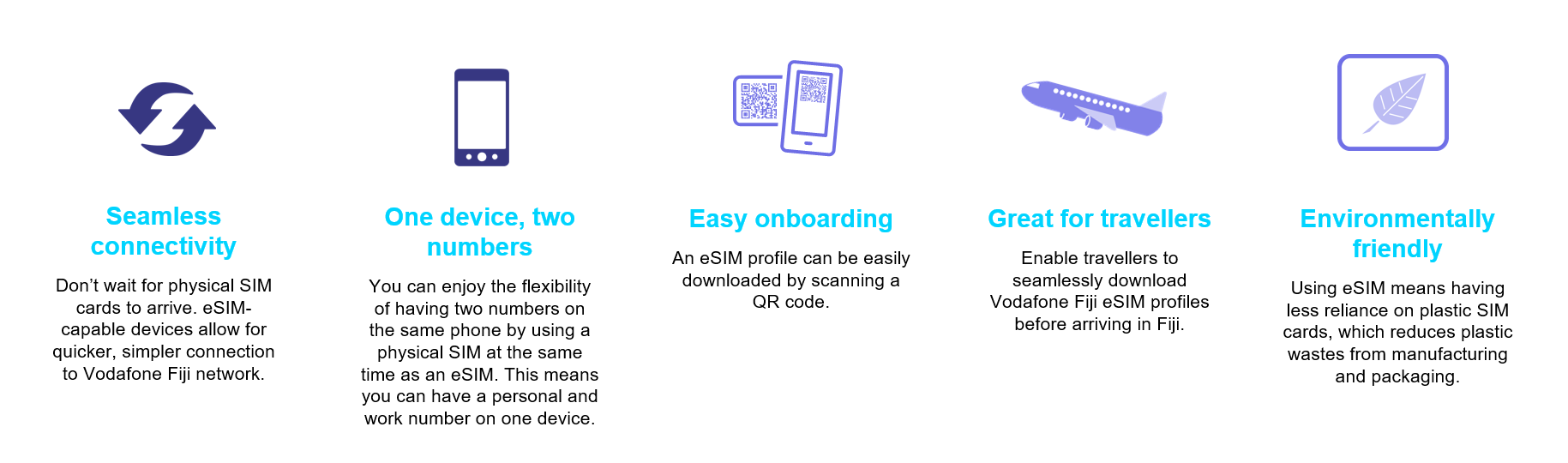
    5. Why choose eSIM?

    ESIM

    6. How to activate a plan on your eSIM enabled smartphone

    Samsung AppleHuaweiGoogle
    Go to 'Settings'Go to 'Settings'Go to 'Settings'Go to 'Settings'
    Select 'Connections'Select 'Mobile Data' or 'Mobile'Select 'Mobile Network'Select 'Network & Internet'
    Select 'Sim Card Manager'Select 'Add Mobile Plan' or 'Add Data Plan'Select 'SIM Management'Next to 'Mobile Operator' select + symbol
    Under eSIMs, tap on 'Add Mobile Plan' Select 'SIM 2'Select 'Don't have a SIM?' or 'Download a SIM instead?'
    Select 'Scan Carrier QR Code' Under type, ensure eSIM is selectedPress 'Next
      Select + symbol above 'Add eSIM' Select 'No Thanks' when asked to use 2 numbers
    This will open QR Code Reader 
    Scan QR Code and wait for eSIM to be activated
    Once eSIM has been added & you have a physical SIM inserted in your device, you will be able to set up your preferred SIM settings and toggle between which sim should be used when making calls, using data or sending an SMS. If you have converted your physical SIM to eSIM, your eSIM will automatically be selected as the default SIM.

    7. Can I use an eSIM and physical SIM on my device?

    Depending on the model of the device and eSIM compatibility (See Q4 for eSIM capable devices), you can use a physical SIM and an eSIM simultaneously. In settings, select which sim you want use when making a call, sending SMS or using data. 

    8. How do I manage multiple eSIM profiles?

    While an eSIM enabled device gives you the ability to activate and use up to more than 5 profiles on an eSIM, you can only use one eSIM profile at a time.

    Once you have more than one plan activated on your device, you can label your plans. For example, you could label one plan Primary and another Secondary, or one plan Work and another Personal. With these labels, you can choose which phone number to use for different functions, such as making and receiving calls and messages or using data.

    9. How do I choose which number to send iMessage’s from?

    If you are using an eSIM enabled iPhone, you can choose which number your iMessage’s are sent from.

    • Go to ‘Settings’
    • Choose ‘Messages’
    • Choose ‘iMessage and FaceTime Line’
    • Select the phone number you want to send from

    10. How do I complete a factory reset on my phone without removing my eSIM profile(s)

    AppleSamsungHuaweiGoogle
    Go to 'Settings'Go to 'Settings'Go to 'Settings'Go to 'Settings'
    Select 'General'Select 'General Management'Select 'System & Updates'Select 'System'
    Select 'Reset'Select 'Reset'Select 'Reset'Select 'Advanced'
    Select 'Erase All Content & Settings'Select 'Factory Data Reset'Select 'Reset Phone'Select 'Reset Options'
    Select 'Erase iPhoneSelect 'Reset'Select 'Reset Phone'Select 'Erase All Data'
    Select 'Erase All and Keep Mobile Plans'Your eSIM will automatically be retainedSelect 'Reset but Keep ESIMS'Your eSIM will automatically be retained
    If you choose ‘Erase All’, any plans on your eSIM will be removed. If you choose ‘eSIMs’, any eSIM plans on your device will be removed. If you choose ‘Reset’, any eSIM plans on your device will be removed. If you choose ‘Erase downloaded SIMs’, any eSIM plans on your device will be removed
    To re-instate one or more eSIM plans to your device you’ll need to visit any Vodafone Stores or contact your Business Account Managers for each plan to continue using them again on your device.

    11. What happens when I remove/deactivate my eSIM profile?

    Once eSIM is removed/deactivated from a device, it cannot be reused. You will need to get a new eSIM profile or use a physical SIM card.

    12. Can I transfer my eSIM from my device to another?

    Each device will need to download a new eSIM profile and then your mobile number can be programmed onto it hence not allowing you to transfer one eSIM profile from a device to another.

    13. What if my eSIM compatible device is not able to scan QR codes to download a profile?

    You will not be able to use eSIM, alternatively, if you have a physical SIM slot available, then you can use this. Scanner problem is a device issue which we have no control of and you may need to get your device repaired or purchase a new eSIM capable device.

    14. What if I decide to sell my eSIM device?

    You will need to replace your mobile number to a new physical SIM or eSIM and remove your eSIM profile before selling your device to someone else. 

    15. Will the contents of my eSIM remain intact i.e. phone contacts, SMS, etc…if I convert/replace my eSIM to physical SIM?

    In any case whether physical or eSIM, contacts phonebook is saved on the SIM card chip itself and not on the network. It’s only the number which gets disconnected and then connected to a new SIM. It will be your responsibility to manage your contacts or the contents saved on the SIM card. We suggest to always save your contact online such as Google account, Samsung account, etc.

    16. Can I use the eSIM on my wearables like my Apple Watch?

    eSIM is currently available on compatible smartphones and tablets and implementation of eSIM capabilities on wearables will take place in the near future

    17. If I purchased an eSIM capable device from other operators or from overseas, will I still be able to use an eSIM from Vodafone Fiji?

    Yes, however you will need to ensure the smartphone/tablet is network unlocked from the operator you purchased your eSIM capable device from, and then visit any Vodafone Fiji Retail outlets to download an eSIM profile. You must also ensure that your device is compatible with Vodafone Fiji network bands/frequencies i.e. 2G – 900MHz ; 3G – 2100MHz & 4G – 1800MHz

    18. If I come into Fiji, can I purchase an eSIM before arriving?

    All eSIM activations are done physically at our retail outlets and authorised partners.

    19. If my device goes missing or is stolen will you still be able to track it?

    Yes. As long as you have the device IMEI and a police report, we will be able to track the device.

    20. If I need have to change devices, will I still need to get a new eSIM Will I retain the same number?

    Yes. If you have purchased a new eSIM capable device, you will need to visit our retail outlets to download a new eSIM profile that can have your new old number reprogrammed onto it.

    T&Cs Valentine's 2021

    • Purchase any Samsung A02s or A12 device and get into the draw to win another Samsung A02s or A12.
    • Offer available at all Vodafone retail outlets
    • Promotion ends 28th February, 2021

    Copyright © 2026 Vodafone Fiji.   Privacy Policy  |  Terms & Conditions  |  Sitemap