Vodafone Giga5G Mobile Data Plans


Unleash 5G Speeds with Vodafone Fiji! We offer flexible prepaid 5G mobile internet plans with generous data bundles and varied validity periods to suit different usage needs. Whether you need large monthly quotas or shorter, smaller data packages, there’s something for you.


Giga5G Daily Plan

$5

20GB
24 Hours
✓ 5G Speeds
✓ Data Rollover
✓ Auto Renewal
✓ Hero Plan Badge
Giga5G Weekly Plan

$12

50GB
7 Days
✓ 5G Speeds
✓ Data Rollover
✓ Auto Renewal
✓ Hero Plan Badge
Giga5G Fortnightly Plan

$20

80GB
14 Days
✓ 5G Speeds
✓ Data Rollover
✓ Auto Renewal
Giga5G Flex Plan

$30

170GB
25 Days
✓ 5G Speeds
✓ Data Rollover
✓ Auto Renewal
✓ Hero Plan Badge
Giga5G Monthly Plan

$40

260GB
30 Days
✓ 5G Speeds
✓ Data Rollover
✓ Auto Renewal
✓ Hero Plan Badge
Giga5G Monthly Plus

$50

350GB
30 Days
✓ 5G Speeds
✓ Data Rollover
✓ Auto Renewal


Where is 5G Available?


Terms & Conditions

The following terms and conditions apply to Vodafone Giga5G Mobile Data Plans:

  • Usability:  Prepaid Vodafone Mobile Internet Users can access 5G services using the following 5G devices provided that their software updates are up-to-date. This list of devices will be updated as soon as device manufacturers release new 5G-ready software updates.
  • Samsung Galaxy S26
  • Samsung Galaxy S26 Ultra
  • Samsung Galaxy S25
  • Samsung Galaxy S25+
  • Samsung Galaxy S25 ultra
  • Samsung Galaxy S24
  • Samsung Galaxy S24+
  • Samsung Galaxy S24 ultra
  • Samsung Galaxy S24 FE
  • Samsung Galaxy S23 FE
  • Samsung Galaxy S23
  • Samsung Galaxy S23+
  • Samsung Galaxy S23 Ultra
  • Samsung Galaxy Z Fold 7
  • Samsung Galaxy Z Flip
  • Samsung Galaxy A57 5G
  • Samsung Galaxy A56 5G
  • Samsung Galaxy A55 5G
  • Samsung Galaxy A54 5G
  • Samsung Galaxy A37 5G
  • Samsung Galaxy A36 5G
  • Samsung Galaxy A35 5G
  • Samsung Galaxy A34 5G
  • Samsung Galaxy A26 5G
  • Samsung Galaxy A25 5G
  • Samsung Galaxy A17 5G
  • Samsung Galaxy A16
  • Apple iPhone 12 and above using iOS 26.2 and above
  • Xiaomi
  • Nubia
  • TCL
  • Oppo
  • Motorola
  • OnePlus
  • Honor
  • Huawei
  • ZTE
  • Auto-renewal: Vodafone Giga5G Mobile Data plans subscribed from *555# and *181# are set to auto-renew after their expiry period. To un-subscribe from the 5G data plans, dial *555# or *181#, select the plan you are subscribed to and select Option 2 to "Un-subscribe".
  • Data rollover: Remaining data will rollover upon auto-renewal or re-subscription of any rollover Data Plan before expiry. The remaining data will roll over to the furthest data plan expiry.
  • Exclusions: Rollover and Auto-renewal do not apply to Vodafone Mobile Data Gift Plans.
  • 5G requirements: To use Vodafone Prepaid 5G Mobile Internet Services, you must have a 5G-capable smartphone updated with a special 5G software update, be in a 5G coverage area, have a 5G-enabled data plan, and ensure that the network mode on your device is set to 5G. Note: Power Saving features may restrict your phone from accessing 5G in order to conserve battery power. Disable Power Saver Mode to access 5G. Customers using a 4G smartphone or a 5G smartphone that has not received a special 5G software update from their device manufacturer, or live outside a 5G coverage area can purchase and use Giga5G data plans at 3G/4G speeds.
    • Special 5G software update: Some 5G smartphones are not 5G-Ready yet as they need a special software update to connect to 5G. These updates are released by smartphone manufacturers. Manufacturers are working to release these updates as quickly as possible. After manufacturers have released a special 5G software update patch, customers will be notified by SMS to update their software.
    • Validity: Promotion is valid until further notice.


    For Aplus Pocket Wi-Fi

    1. Open browser and go to the link http://192.168.1.1/
    2. Enter the admin Username and Password. Select “Log In”. (Default Username is “admin”, default password is “admin”)
    3. Select “Settings” on the Navigation bar.
    4. Select “Internet”
    5. Select “Mobile Connection”
    6. Scroll Down to Network Mode and change Network Mode to “4G”.
    7. Select “Apply” to save changes.

    RED Flix Data Top-up Packs

    Top-Up PacksPrice (VIP)Peak (GB)Off-Peak (GB)Total (GB)
    5GB$4.892.52.55
    20GB$19.56101020
    30GB$29.35151530
    40GB$39.13202040
    100GB$97.835050100

    Peak - Mon-Fri (7am to 11pm)

    Off-Peak - Mon-Fri (11:01pm to 6:59am) Fri-Mon (11:01pm to 6:59am)
    Terms and Conditions

    • Flix Plans are available to Postpaid Vodafone Broadband customer only.
    • FREE pocket Wi-Fi or Router available on 24 months contract depending on plan chosen.
    • Data is divided into peak period, off-peak period, and Bonus Data.
    • Peak period is from 7am to 11pm Monday to Friday.
    • Off-peak period is from 11.01pm to 6.59am Monday to Friday and 11.01pm Friday to 6.59am Monday.
    • Streaming Data is allocated for use by the following apps & websites for streaming and video conferencing purpose: Netflix, Amazon Prime, Zoom, MS Teams, Skype, Google Hangouts/Meet.
    • Subscription to access MS Teams, Skype Out, Zoom, Google Hangouts/Meet, Netflix and Amazon Prime content is not included in this data package.
    • Accessing Netflix, Amazon Prime, MS Teams, Skype Out, Zoom, Google Hangouts/Meet requires a positive Peak/Off-Peak data balance.
    • Content such as ads, authentication and app analytics are excluded and will be deducted from any Peak/Off-Peak available data balance.
    • Data top-up options are available after data is exhausted.
    • Plan is inclusive of VAT.
    • New Data balance may not reflect accurately on the MyVodafone App.
    • For more information, please contact Customer Care on 124 (Free) or 123 (Charged), or visit our website www.vodafone.com.fj

    T & Cs - Mother Day Specials

    • Available at all Vodafone Retail Outlets
    • Promotion ends 15th May, 2021 or while stocks last.

    Samsung A32 | A02 - Terms & Conditions

    • Available at all Vodafone Retail Outlets
    • Purchase any Samsung A Series device and go into the weekly draw to win $15,000 worth of cash prizes
    • Promotion ends 31st May, 2021

    April Device Promo Terms & Conditions

    • Available at all Vodafone Retail Outlets
    • Price valid till 31st April, 2021

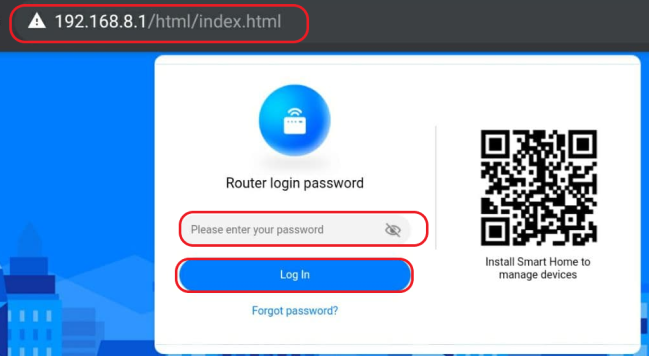
    For Huawei Pocket WiFi:

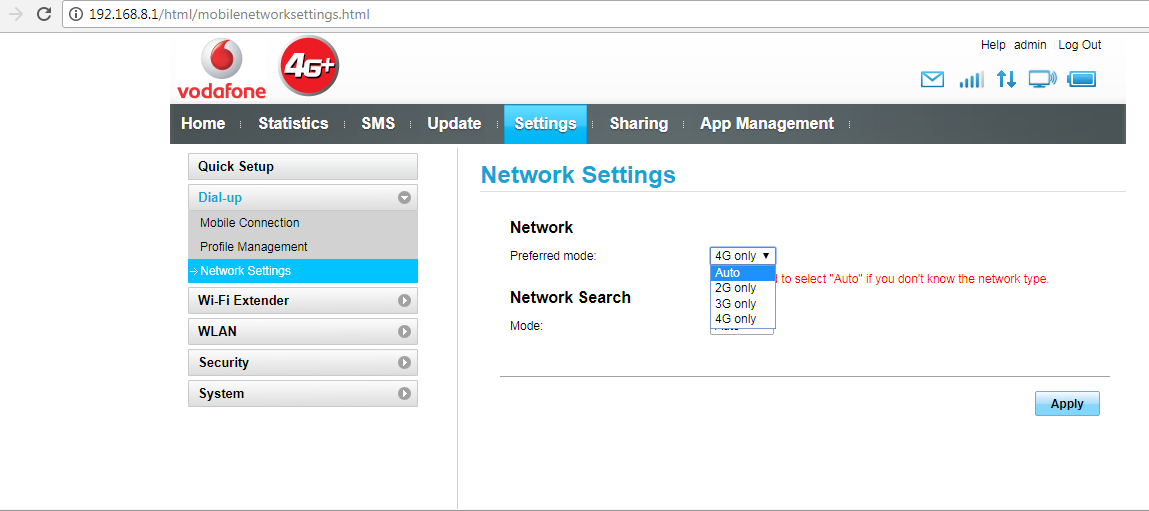
    1. Open browser and Go to the link 192.168.8.1
    2. Enter the admin Password and select Log In.
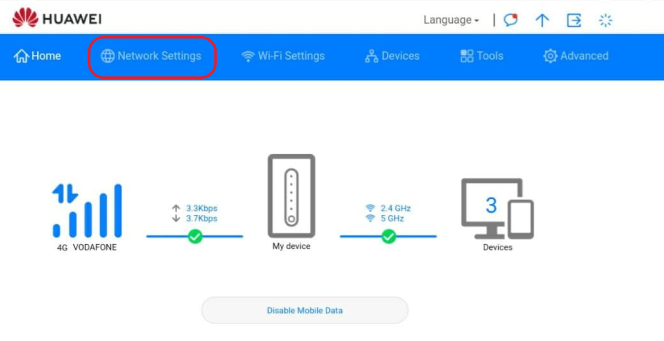
    3. Go to the “Settings” tab.
    4. Select “Network Settings”.
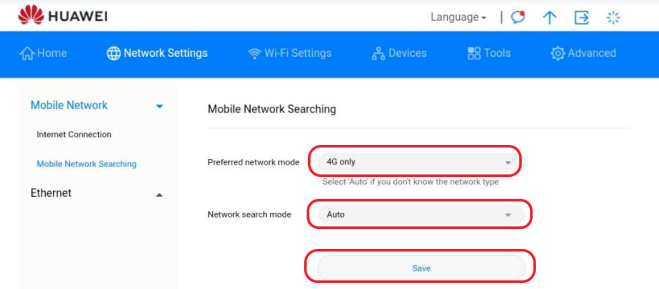
    5. Change Preferred mode to “4G Only”.
    6. Select Network Search Mode to “Auto”.
    7. Select “Apply” to save changes.
    hu 1

    For Huawei Router:

    1. Open browser and Go to the link 192.168.8.1
    2. Enter the admin Password and select Log In.
    3. Select the “Network Settings” tab.
    4. Change Preferred mode to 4G Only.
    5. Select Network Search Mode to Auto.
    6. Select Save to apply changes.

    huawei 1

    huawei 2

    huawei 3

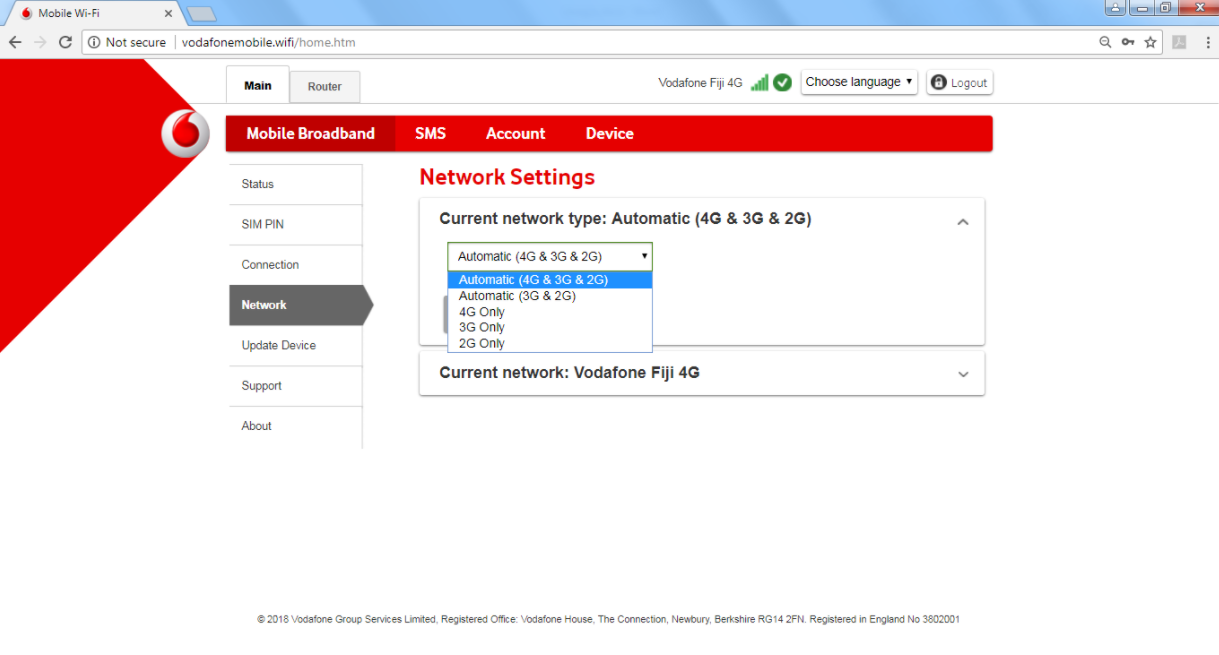
    For ZTE Pocket Wi-Fi:

    1. Open browser and Go to the link vodafonemobile.wifi
    2. Enter the admin Username and Password and Log In
    3. Under “Main”, Select “Mobile Broadband”
    4. Select “Network”
    5. Change “Current network type” to “Automatic (4G & 3G & 2G)” or “4G Only”
    6. Select “Save” to save changes.
    ZTE Pocket WiFi

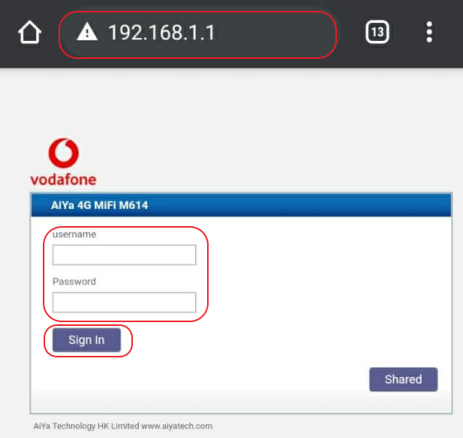
    For Aiya Pocket Wi-Fi:

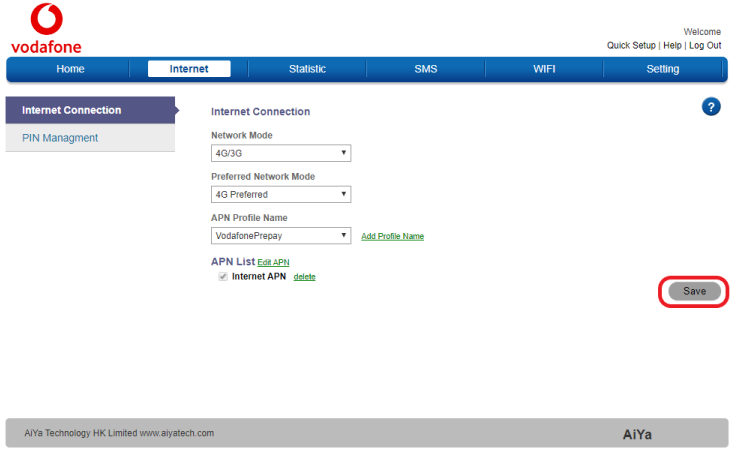
    1. Open browser and go to the link http://192.168.1.1/
    2. Enter the admin Username and Password. Select “Sign In”. (Default Username is “admin”, default password is “admin”)
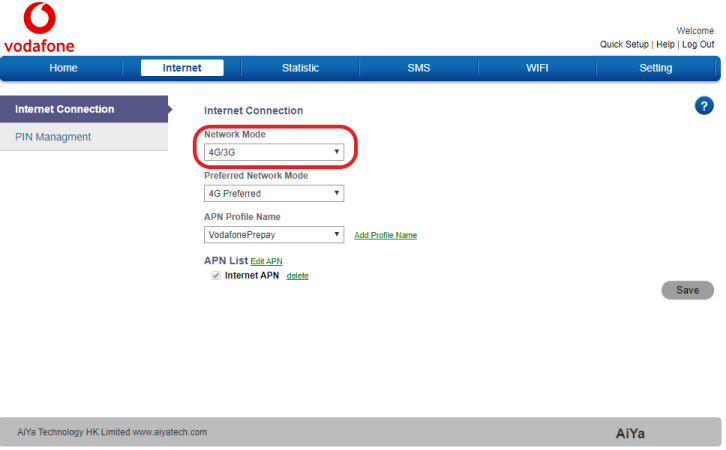
    3. Select “Internet” on the Navigation bar.
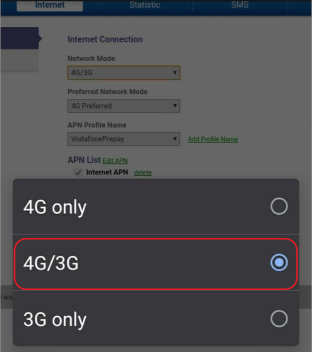
    4. In Network Mode, select “4G/3G”.
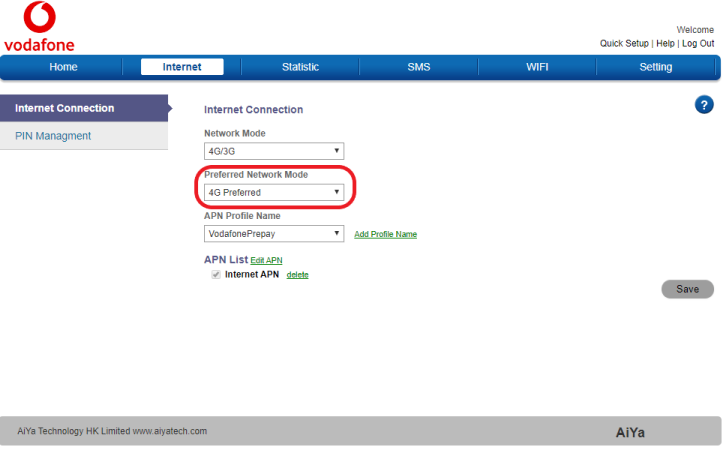
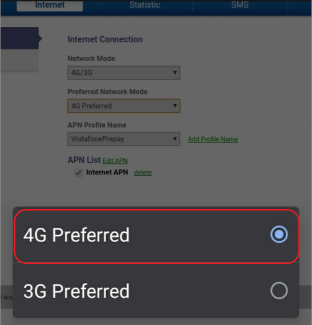
    5. In Preferred Network Mode, select 4G Preferred.
    6. Select “Save” on the same page.

    aiya 1

    aiya 2

    aiya 3

    aiya 4

    aiya 5

    aiya 6

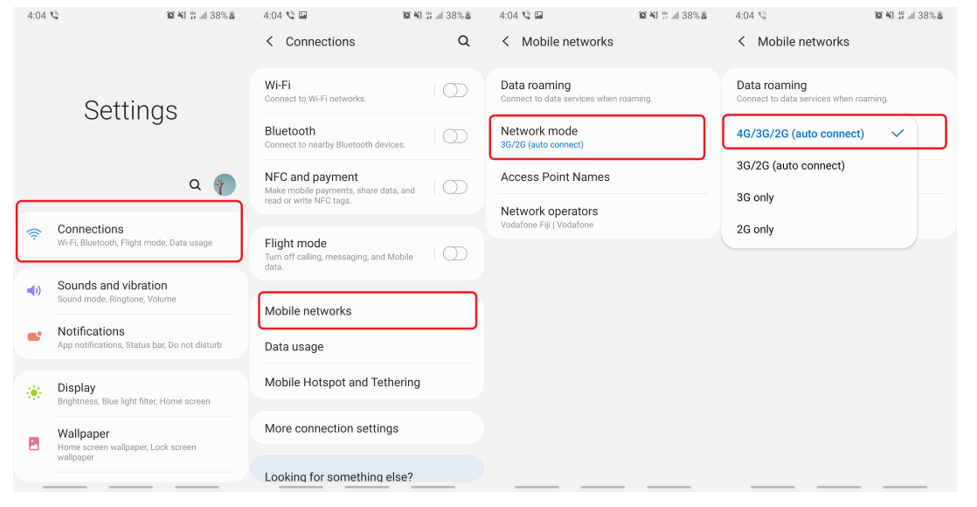
    For ANDROID:

    1. Go to “Settings”.
    2. Select “Connections”
    3. Select “Mobile networks”.
    4. Select “Network mode”
    5. Select “4G/3G/2G (auto connect)”.
    android ios setup

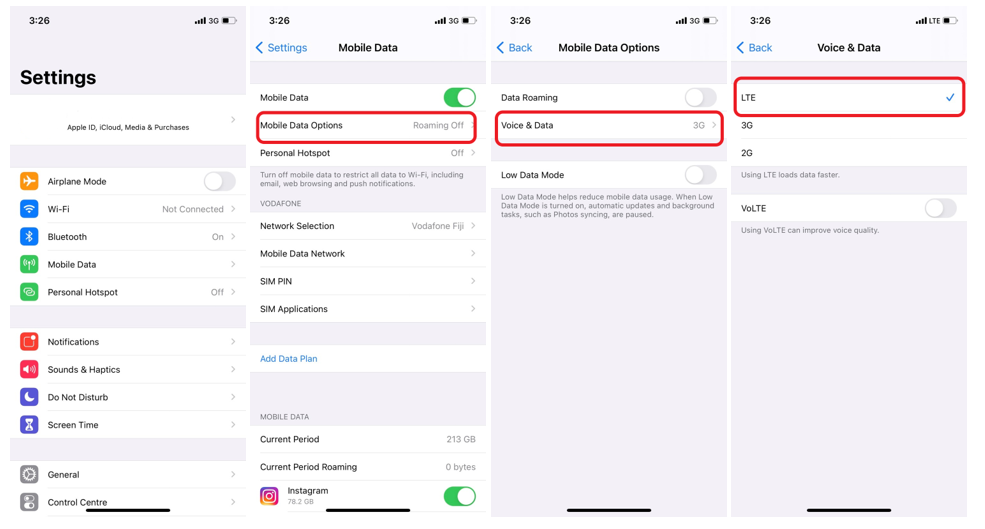
    For APPLE iOS:

    1. Go to “Settings” and Select “Mobile Data”
    2. Select “Mobile Data Options”
    3. Select “Voice & Data”.
    4. Select “LTE” to access the 4G/3G/2G network. 
    apple ios setup

    For Huawei’s Harmony OS:

    1. Go to “Settings”
    2. Select “SIM card & mobile networks”
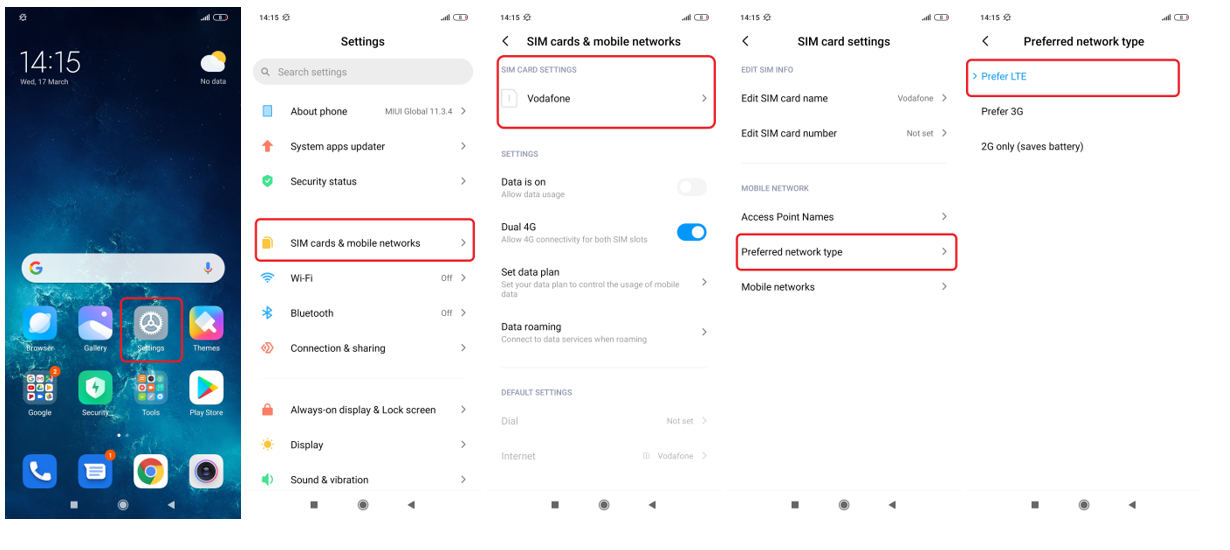
    3. Under “SIM Card Settings”, Select either SIM1 or SIM2.
    4. Under “Mobile Network”, Go to “Preferred network type”
    5. Select “Prefer LTE” to access the 4G/3G/2G network.
    huawei harmony setup

    For OPPO Android:

    1. Go to “Settings”
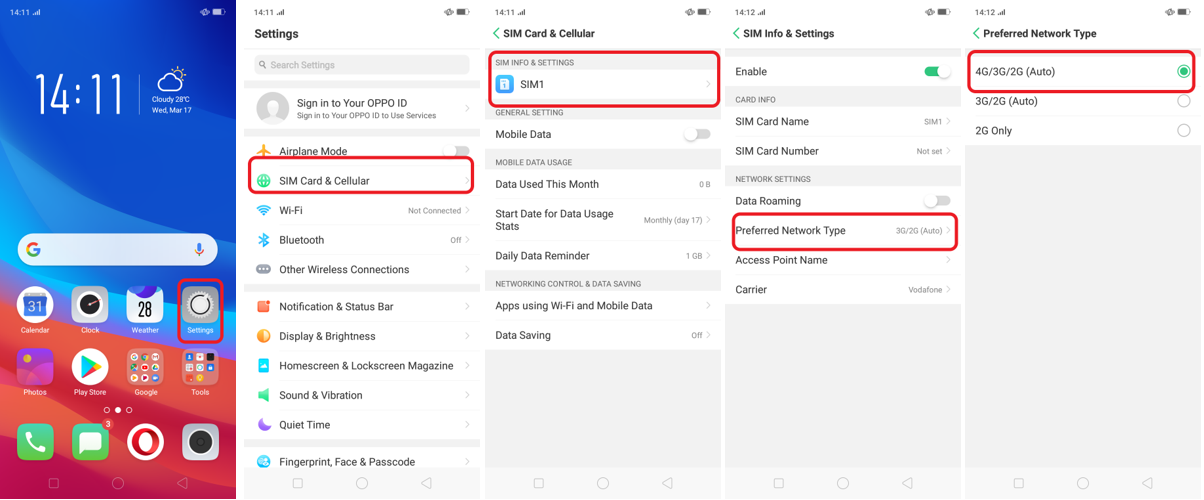
    2. Select “SIM Card & Cellular”
    3. Under “SIM Info & Settings”, Select either SIM1 or SIM2.
    4. Under “Network Settings”, Go to “Preferred Network Type”
    5. Select “4G/3G/2G (Auto) to access the 4G/3G/2G network.
    oppo android setup

    For Windows:

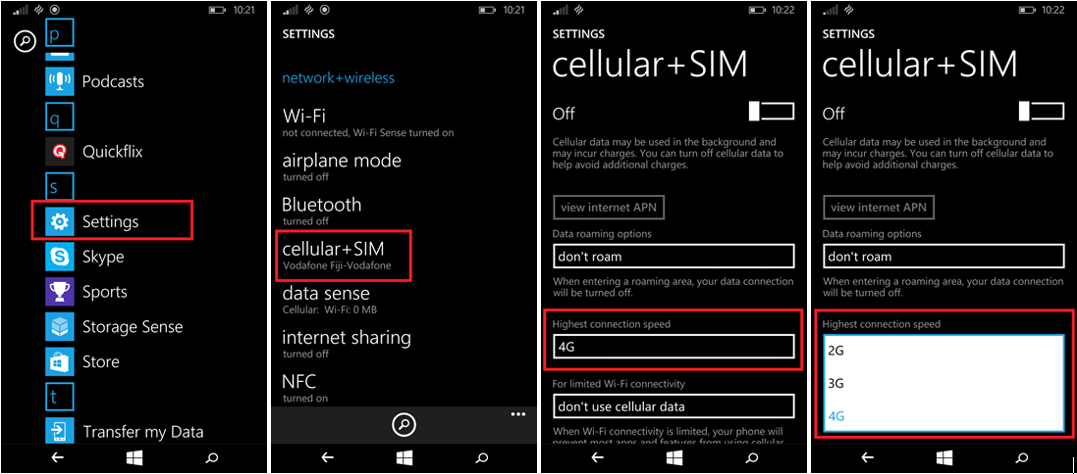
    1. Go to “Settings”
    2. Tap on “mobile+SIM” or “cellular+SIM”
    3. Tap on “Highest Connection Speed”
    4. Select 4G
    windows setup


    Broadband Devices - T&Cs

    • Purchase your very own 5G or 4G+ Broadband Pocket WiFi or Router today and get a Free Broadband Data SIM.
    • Broadband Devices are available at all Vodafone, Valuefone and Vodafone Roadshow locations.

    Voice & SMS Plans - T&Cs

    • Real Money and IOU can be used to subscribe to these plans.
    • Plans are subject to auto renewal after 27th June, 2025
    • Calls and SMS are applicable to On-net numbers.
    • On-net means Vodafone to Vodafone and Vodafone to Inkk.
    • International minutes for the Chit-Chat Local and Overseas plan are applicable to selected countries which includes: New Zealand, Australia, China, India, USA, Canada, Sri Lanka and Japan.
    • Standard charges will apply outside the bundle for all the plans.
    • Offer is applicable to Vodafone Prepay customers.
    • Promotion end date will be communicated via SMS Broadcast.
    • For more information, call our customer care line 123 (Charged), 124 (Free for Prepay).

    iPhone 12 Pro Max Terms and Conditions:

    • 1 lucky winner wins an iPhone 12 Pro Max.  
    • Multiple entries are allowed.
    • Each text to 214 costs 99 cents.
    • Prizes cannot be redeemed for cash.
    • Promotion applicable to Vodafone Prepay, Postpay and Inkk customers only.
    • Vodafone mobile numbers starts with 80, 83, 86, 89, 90, 91, 92, 93, 94, 97, 99, 22, 27, 28, and 29.
    • Inkk mobile numbers starts with 84, 87, 95, 96, 98, 21 and 20.
    • IOU credit can be used.
    • Prize(s) color and specification may vary.
    • Picture is for illustration purpose only.
    • Promotion ends 3rd April, 2021.
    • Image simulated.
    • For Queries call Vodafone Customer Care on; Vodafone Prepay: 124(Free) or 123 (Charged), Vodafone Postpay: 125 (Free), Inkk Mobile: 444 (Free) or 443 (Charged).
    • For full terms and conditions visit www.vodafone.com.fj 

    Broadband Device Deals - Terms & Conditions

    • Available at all Vodafone Retail Outlets
    • Promotion valid till 31st March, 2021 or while stocks last

    3. How much will an eSIM profile cost?

    • If you wish to program your current number(s) on an eSIM, then this can be done free of charge once off (max of 2 numbers)
    • If you wish to have additional numbers converted to an eSIM or purchase a new eSIM number, you will need to purchase this at $4.70 VIP per eSIM profile.

    Please note that only one eSIM profile can be used at a time.

    Copyright © 2026 Vodafone Fiji.   Privacy Policy  |  Terms & Conditions  |  Sitemap